
AI-Augmented Modeling in Sparx EA
AI-Augmented Modeling means the architect decides what to model and in which language, and AI does the transcribing into the governed Sparx EA model. The architect also decides how much detail each part needs.
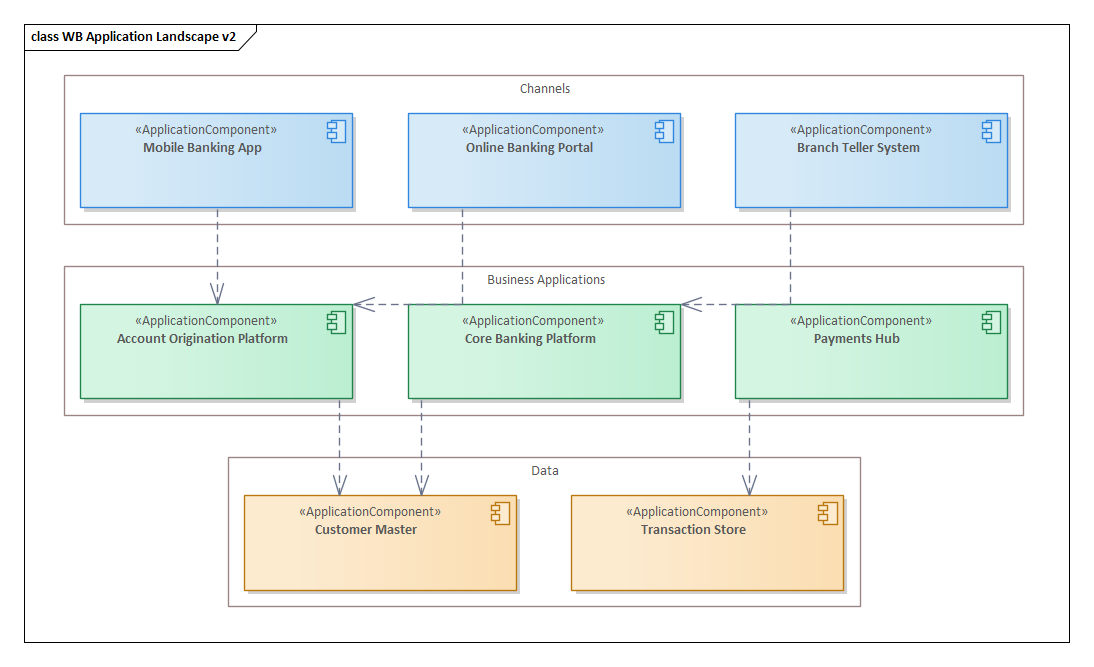
What the work is
Modeling is turning what the architect knows, reads or is handed into a formal, governed model: elements, relationships, diagrams and the modeling language that defines them.
Architects spend a lot of time transcribing what they see into the tool. Most of that source material is lists, hierarchies and sequences, and that work can be automated.
It shows up most in two situations: the application portfolio you were handed as a spreadsheet, and the model the project teams moved on from months ago. Both are the groundwork for application portfolio management.
What changes when AI does the transcribing
You are handed an application inventory as a spreadsheet and asked for it in the model by Friday. With AI doing the transcribing, the week goes to deciding what belongs in the model.
What it gives the team: a model that covers the whole portfolio instead of the part someone had time for, built in your own modeling language, and updated as projects deliver.
What your architects can now get done
Each task shows how architects do the work today, how it changes with AI, and the skill it now asks of them. AI is only as good as the person prompting it.
Get a spreadsheet, inventory or document into the model
Today an architect reads the source and re-keys it into the tool, element by element, and the part of the portfolio that gets modeled is the part someone had time for. The AI-augmented way is to hand over the whole inventory with clear instructions: which MDG applies, what each column means, what level of detail belongs in the model. AI builds the elements and connections, and the architect reviews what came in.
The skill is scoping and instructing: deciding what belongs in the model and saying so precisely enough that the result is usable.
Tools that help: Claude + AI Power Tools suits large or messy sources, because the work runs in checked steps. GitHub Copilot + AI Power Tools suits architects who already work in VS Code. Kernaro Assist suits an architect who wants to describe changes in natural language without leaving Enterprise Architect.
Choose the right diagram for a stakeholder’s question
Today an architect picks a diagram type from habit, places elements by hand and adjusts until it looks right. The AI-augmented way starts from the stakeholder’s question: what do they need to understand, and what should the diagram leave out? AI recommends the diagram type and viewpoint, composes it, lays it out and checks the result.
The skill is framing the question and deciding what stays off the diagram, because a diagram that reads as deliberate is one where something was left off on purpose.
Tools that help: Claude + AI Power Tools recommends the viewpoint and checks the layout. GitHub Copilot + AI Power Tools reaches the same repository for architects who work in VS Code.
Finding your way around the model
Today an architect draws navigation diagrams by hand, and they go stale as the model changes. The AI-augmented way starts with the people who will use them: what experience do you want a stakeholder to have when they open the model, where should they land, how should they drill down? You express that intent, and AI builds the navigation diagrams and keeps them current.
The skill is designing the experience and stating the intent clearly. The drawing is no longer the architect’s job.
Tools that help: Claude or GitHub Copilot with AI Power Tools.
Set up the modeling language, or find out what you already have
Today an architect works out what the stereotypes in a repository mean by reading the model, and building an MDG means hand-editing XML. The AI-augmented way starts by stating the standard: which stereotypes are policy and which are history, and what the modeling language should enforce. AI assesses what is in the repository, then writes, rolls out and tests the MDG.
The skill is knowing the organization well enough to say what the standard should be, and checking that the result enforces it.
Tools that help: An architect can take this work from assessment to rollout with Claude + AI Power Tools. Kernaro Assist works inside the MDG once it is in place.
Move models and diagrams to where they are needed
Today, moving a package to another repository or producing diagrams for people without EA means repeated manual exports and rework. The AI-augmented way is to say who needs what: which package goes to which repository, which diagrams go to which readers, and in what format. AI runs the exports and imports.
The skill is knowing the audience and what should leave the repository, then stating it as a clear request.
Tools that help: Claude + AI Power Tools or GitHub Copilot + AI Power Tools, whichever your architects already use.
Which tools help with this job, and when
For modeling, the right tool depends on where your architects already work.
- Kernaro Assist
Fits an architect who stays inside Enterprise Architect all day and wants to describe each change in natural language. It works within EA and does not reach beyond it.
- Kernaro AI Hub
Fits a team that wants a shared web front door for questions and reports. Model Chat and reports read the model, and Intelligent Flow automations can create and update elements where configured, so most modeling still happens in another tool.
- Prolaborate 6 with AI
Fits stakeholders who already live in Prolaborate and want generated descriptions, summaries and answers about the model. It explains the model rather than building it.
- Claude + AI Power Tools
Has the widest range of guided modeling work, from building and laying out models to checking them.
- GitHub Copilot + AI Power Tools
Reaches the same repository from VS Code, for architects who already work there.
- Microsoft 365 Copilot
Fits when it is the only AI you may use. It reads published data and does not author in EA.
The human skills that make modeling work
AI will model whatever it is handed. What it cannot do is decide what belongs. These calls stay with the architect:
What to model, and at what granularity. Only the architect can decide what belongs in the repository.
Which language fits the domain. Your MDG, ArchiMate or something else is the architect’s choice.
What to leave off a diagram. A diagram reads as deliberate when something was left out on purpose.
Whether a stereotype is a standard or an accident. It may be policy or history, and only a person who knows the organization can tell.
Automation checks completeness, people own correctness. Knowing the architecture well enough to make the call, and knowing what to ask next, is what our training and mentoring build.
How we help
Train and mentor your architects
We teach your architects to model this way on your own repository, using the spreadsheets and documents your team is actually handed, and mentor them until it sticks.
Foundations courses:
For ArchitectsBuild the model for you
Consulting for organizations that are capacity constrained or need results quickly. We build the model in your own MDG and hand it over.
Build and update your architecture model for you