
AI-Augmented Stakeholder Engagement in Sparx EA
Generate quality insights from your Sparx Systems Enterprise Architect model and surface them where stakeholders already work, so architects spend their time on business problems instead of pulling numbers.
What the work is
Stakeholder engagement is generating quality insights from the architecture and surfacing them in the places stakeholders need them: the dashboards, pages, documents and conversations they already use.
Your architecture model should be an enterprise data source, read by the people who make decisions about the portfolio, the budget and the risk. That only works if the data is complete, correct and current, and keeping it that way used to take the time architects needed for the stakeholders themselves.
AI can get the architecture data ready for reporting and analysis, and put the insights where people read, so your architects spend more time with stakeholders on their business problems.
What changes when the model becomes a data source
A portfolio lead asks how many Business-Critical applications one team owns, what they cost and which regulation reaches them, and will act on the answer. Today the architect pulls the numbers by hand, translates them after the meeting, and hopes the model was current.
With AI the architect can check and complete the data first, then answer from the whole model in the lead’s vocabulary, in the dashboard or the page the lead already opens, with an honest statement of how complete the data is. The time that went into pulling numbers goes into the conversation about what to do.
What it gives the team: an architecture model that the organization reads and trusts, and architects who are in the room for the decision instead of preparing for it.
What your architects can now get done
Each task shows how architects do the work today, how it changes with AI, and the skill it now asks of them. AI is only as good as the person prompting it.
Get the architecture data ready to be read
Today nobody knows how complete the model is until a number looks wrong in front of a stakeholder. The AI-augmented way is to check the model before anyone reads it: find the elements with missing owners, criticality or lifecycle, reconcile what the model says against the systems of record, and fill or flag the gaps.
The skill is deciding what complete means for each audience, because a finance reader and a risk reader need different fields to be right.
Answer a portfolio question in the stakeholder’s words
Today an architect pulls the numbers by hand and translates them into the stakeholder’s vocabulary, usually after the meeting. The AI-augmented way is to ask for the roll-up in the business’s own terms and get it from the whole model, with the evidence.
The skill is understanding what the stakeholder is deciding, because the question they type and the decision they are making are often different things.
Say honestly how complete the data is
Today a roll-up goes out looking authoritative, whatever sits underneath it. The AI-augmented way is to count the reporting data back against the repository and list the places where the model and its modeling language disagree, so every answer carries its own completeness statement.
The skill is deciding what to say about it, because a roll-up looks equally authoritative at 12% fill and at 100%.
Put the architecture in the dashboards and tools people already open
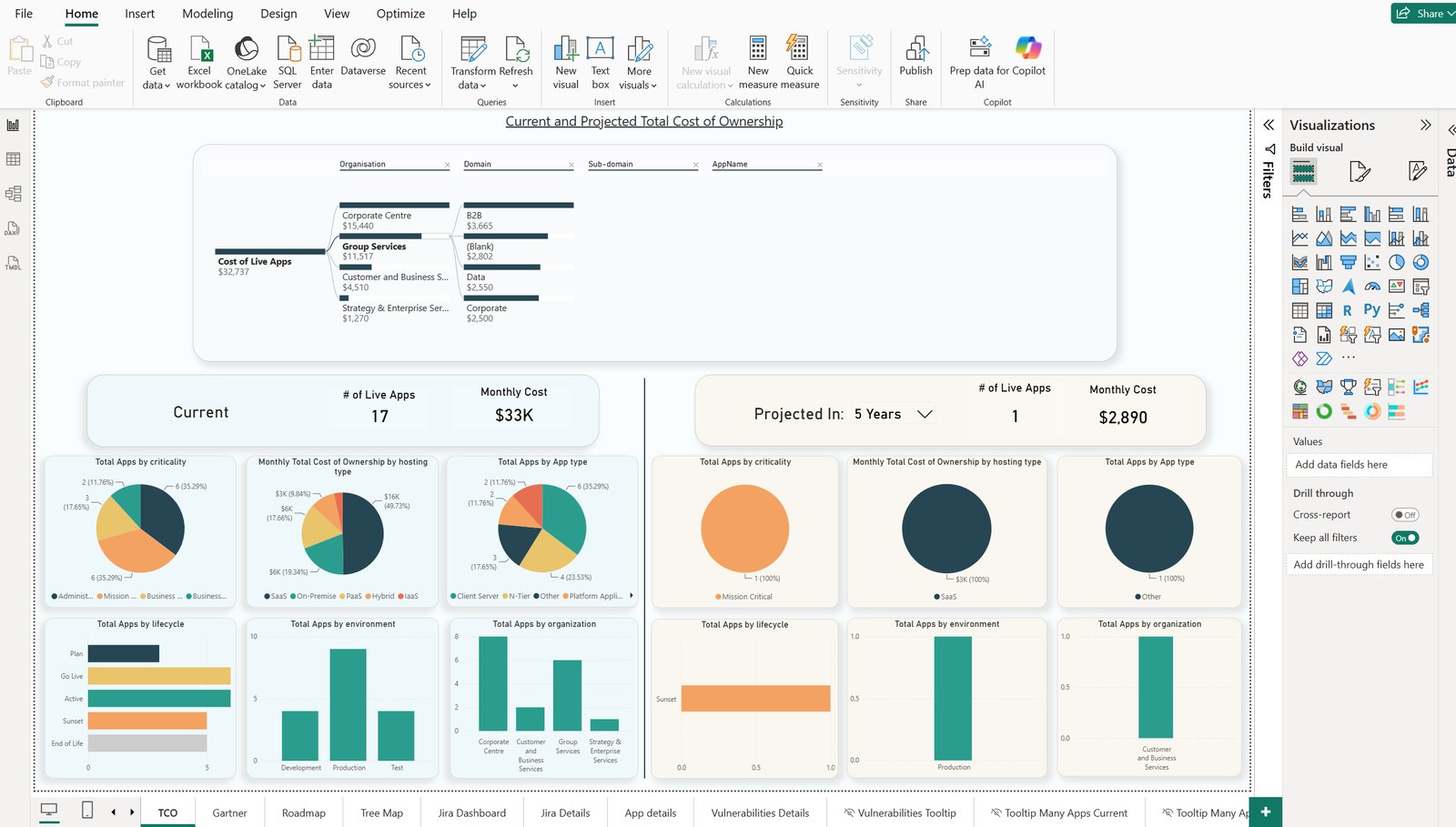
Today architecture answers live in EA, reachable by the licensed few who know the tool. The AI-augmented way is to say which questions the dashboards must answer and in whose vocabulary, turn the repository into a reporting database in that vocabulary, and feed it to Power BI, Microsoft 365 Copilot, Microsoft Fabric or your data warehouse.
The skill is choosing the questions and the vocabulary.
Give stakeholders views in Prolaborate
Today a Prolaborate dashboard is built by someone who knows the product, and often reflects what is easy to show. The AI-augmented way is to describe the view the stakeholder needs and have AI build and read the dashboards and relationship matrices.
The skill is designing the view from the reader’s side: what they look for first and what they can ignore.
Write for the reader who will never open EA
Today documents, Confluence and SharePoint pages and diagram exports for business readers are assembled by hand for each audience, and go stale as soon as the model moves. The AI-augmented way is to say who the reader is and what they need to decide, and have AI generate the document, the page content or the diagram set from the current model.
The skill is writing for the reader: choosing what they need and leaving out the rest.
What tool should my stakeholders use to view architecture content and insights?
Usually the one they already have open. Stakeholders rarely open the modeling tool, so the model stays the source and the insights go to the place each audience already reads.
- Enterprise Architect
Where the architects work and the model lives. It stays the single source, and AI keeps it complete and current so everything downstream can be trusted.
- Prolaborate
The web window for people who read architecture without modeling it: dashboards, relationship matrices and diagram views, which an architect can now build and read with AI, plus generated descriptions and summaries in Prolaborate 6 with AI.
- Confluence and SharePoint pages
Where project teams and business units already read. Generated page content, documents and diagram sets from the current model, placed where the team looks, instead of a diagram pasted once and never updated.
- Kernaro AI Hub
A shared web front door for a team: Model Chat for questions, impact analysis with context from Jira, Confluence, Azure DevOps and SharePoint, a Word and Excel report builder, and the Kernaro Connector for Power BI.
- Power BI
Dashboards in the business’s own vocabulary. Our recommended route is Kernaro AI Hub, which Power BI reads live through its GraphQL endpoint; without Hub, we build a reporting database and the Power BI model from your repository.
- Microsoft 365 Copilot
Read-only answers in Microsoft 365 Copilot Chat from the published Power BI model, or through Kernaro AI Hub’s read-only API. The AI most organizations already license, answering from your architecture data.
- Teams and Slack
Stakeholders ask where they already talk. Microsoft 365 Copilot does this in Teams today from the published model. For Slack, an assistant connected to the same published data answers the same questions; which assistant depends on what your organization has approved.
The human skills that make stakeholder engagement work
AI can produce the insight and put it where people read. What it cannot do is know what the stakeholder is deciding. These calls stay with the architect:
What the stakeholder actually asked. The question they type and the decision they are making are often different things.
What to say about completeness. A roll-up looks authoritative at 12% fill and at 100%. The tool reports how complete the data is. The architect decides how to say it.
Whether a confident answer still needs a check. Plain-language answers from AI read as certain whether or not the data underneath is.
Which conversation to have next. Once the numbers are in the dashboard, the architect’s time goes to the business problem behind the question.
Automation checks completeness, people own correctness. Knowing the architecture well enough to make the call, and knowing what to ask next, is what our training and mentoring build.
How we help
Train and mentor your architects
Training and mentoring that teach your architects to get the data ready, produce business-readable answers from the model, and say what the data can and cannot support, using the questions your stakeholders actually ask. We stay with them until it sticks.
For ArchitectsBuild the reporting for you
Consulting for organizations that are capacity constrained or need results quickly. We build the reporting database on your Sparx EA repository, get the data into OneLake or your warehouse, construct the Power BI semantic model and build the dashboards and Prolaborate views your stakeholders open.
Getting your EA data into Power BI and the rest